Build Your Seasonal Gear Rotation Bin
The Setup
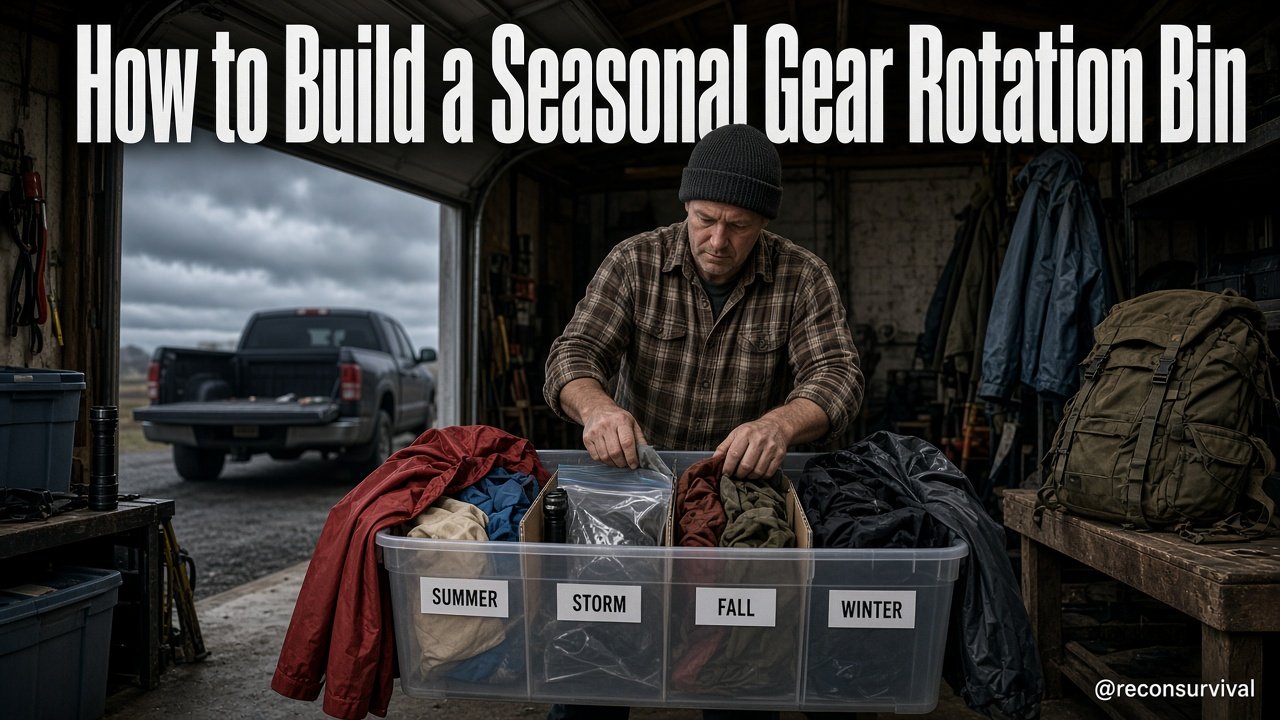
Take a single, medium-sized storage bin and a set of four clearly labeled dividers or zip-top bags. Fill the bin with one complete set of clothing and gear for Summer, Storm, Fall, and Winter. Place the dividers inside the bin to create four distinct compartments, each holding only the gear for that specific season. If the weather is currently Summer, pull the "Summer" section out of the bin and place the other three seasons back into storage or a separate "Off-Season" bag. This physical separation forces a binary decision: either you have the gear you need for the current season, or you don't. You eliminate the need to search through a chaotic mix of clothes to find a rain jacket in a heatwave or a heavy coat in a thunderstorm.
As an Amazon Associate, I earn from qualifying purchases.
This drill matters because it transforms abstract preparedness into a tactile reality. Most people own gear for all seasons but store it in a single jumbled pile. When a sudden storm hits or a temperature drop occurs, you waste critical time digging. By rotating the gear physically, you ensure that when you need the "Storm" kit, it is immediately accessible and verified. The bin becomes a visual status report: if the "Storm" compartment is empty, you know immediately that you are unprepared for rain, rather than discovering the missing item when you are already soaked.
Recon Survival Principle
The Recon Survival standard for gear is not accumulation; it is retrieval. A kit is only as good as the time it takes you to assemble it under stress.
The core principle here is modular rotation. Your gear should not be static; it must flow with the seasonal cycle to prevent the "clutter tax" – the mental and physical energy lost searching through off-season items. By physically separating Summer, Storm, Fall, and Winter gear into distinct modules within a single container, you reduce the probability of error to near zero. This method ensures that critical items are never "lost" because they are buried under the wrong season's gear. The bin acts as a filter: if the gear isn't in its designated slot, it isn't ready for deployment. This creates a system where readiness is visually obvious and physically guaranteed.
Rotating the Storm and Seasonal Modules
The first phase of this drill focuses on the specific categorization of your gear into four distinct "modules." You must audit your current inventory and sort every item into one of these four categories: Summer, Storm, Fall, or Winter.
1. The Summer Module
This set is not just about heat; it is about sun and hydration. * Core Items: Lightweight moisture-wicking shirts, sun hats, high-SPF sunscreen, and ample water capacity. * The Rotation: When Summer arrives, this is the only module you access from the main bin. All other modules are stowed away.
2. The Storm Module
This is your most critical, often overlooked module. It is for sudden weather events regardless of the calendar. * Core Items: Rain jacket, waterproof pants, emergency blankets, high-visibility gear, and sealed electronics protection. * The Rotation: This module must be the most accessible. It is the "trigger" item. If the sky turns gray, you grab this module immediately.
3. The Fall Module
A transitional phase requiring versatility for variable temperatures. * Core Items: Light fleece, windbreakers, hiking boots, and headlamps (as days shorten). * The Rotation: Rotate this in as daytime temperatures begin to drop below 60°F (15°C).
4. The Winter Module
The heavy-duty kit for cold and snow. * Core Items: Insulated parkas, thermal layers, gloves, hats, and traction devices for footwear. * The Rotation: Rotate this in when the temperature consistently stays below freezing.
Action: Take your current gear and place these items into four separate bags or sections. Label them clearly. Do not mix items. If you have a winter hat in your summer bag, it belongs in the Winter module.
Scoring Your Gear Readiness
Once the bin is populated with the four rotated modules, you need a way to verify that you haven't lost track of critical items. Use the Pass/Fix/Retest standard to score your bin's readiness.
The Scoring Criteria
For each of the four modules, ask three specific questions:
- Completeness: Does this module contain every item listed for this season? (e.g., Does the Storm module have the rain jacket and the waterproof pants?)
- Functionality: Is the gear in working order? (e.g., Is the rain jacket waterproof? Do the batteries in the headlamp have charge?)
- Accessibility: Can I pull this specific module out of the bin in under one grab without unpacking the others?
The Standard
- PASS: The module is complete, functional, and immediately accessible. The bin is ready for deployment. * FIX: The module is missing an item, or a piece of gear is broken. You must stop, retrieve the missing item or fix the gear, and move to the Retest phase. * FAIL: The module is disorganized, items are missing, or you cannot locate a critical piece of gear within one grab. You must rebuild the module.
Why this scoring matters: It prevents the "false sense of security" where you think you have a rain jacket because you own one, but it's buried at the bottom of a pile. By forcing a visual check of each module, you validate the system's integrity.
Fixes for Missing Critical Items
It is common to discover during the scoring phase that you are missing a critical item or that a piece of gear is in disrepair. Here is how to handle those failures without compromising your system.
Scenario 1: Missing Item
If you discover the "Storm" module is missing the waterproof pants:
- Immediate Action: Do not leave the bin "half-ready." Go to the store or the back of the closet to retrieve the item now. * System Update: Add the missing item to the module immediately. Do not wait for the "next season." The system must be functional today.
Scenario 2: Broken Gear
If the winter gloves are torn or the summer sunscreen is expired:
- Immediate Action: Remove the broken item from the Winter module. If it is a critical safety item (like a flashlight that doesn't work), flag it as "FIX REQUIRED."
- System Update: Place the broken item in a "Repair/Replace" zone outside the bin. Do not keep broken gear in your rotation bin, as it creates a false sense of security.
Scenario 3: Disorganized Module
If the "Fall" module is just a jumbled pile of clothes:
- Immediate Action: Empty the module. Re-sort the items by function (e.g., outer layers vs. base layers). * System Update: Re-pack the module neatly. The goal is to make the next retrieval faster than the current one.
The Rule of Thumb: If a module scores "Fail" or "Fix," you cannot consider the bin ready. You must complete the fix before marking the bin as "Ready." This ensures that when a seasonal shift happens, you are not scrambling to find a solution.
Retest and Maintenance Cycle
Once your bin is assembled and scored, the drill is not over. You must establish a cycle to maintain the system. A bin left unchecked will eventually degrade into a pile of clutter.
The Retest Schedule
- Monthly Quick Check: Once a month, pull the current season's module out. Shake it, feel the weight, and ensure the items are still there. This takes 5 minutes. * Seasonal Full Audit: At the start of each new season (Summer, Storm, Fall, Winter), perform the full scoring criteria. Check for expired items (sunscreen, batteries) and replace them. * Post-Storm Review: After any significant weather event, review the "Storm" module. Did you use anything? If so, replace it immediately. Did the gear work? If not, repair or replace.
The "Ready" Tag
Attach a simple status tag to the bin lid. * Green Tag: All modules complete and functional. * Yellow Tag: One module requires attention (e.g., missing a small item). * Red Tag: Critical module missing or broken.
This retest cycle ensures that your "prepared version of you" remains calm. When the weather turns, you don't have to wonder if you have the gear; the bin and the tag tell you instantly. You are not searching for batteries; you are checking a system that is designed to work.
Do Today
The only way to stop losing track of critical items is to make the rotation physical and visible.
Your Immediate Action:
- Gather one bin and four labeled containers or bags. 2. Sort your current clothing and gear into the four seasonal categories (Summer, Storm, Fall, Winter). 3. Test the "Storm" module right now. Can you grab it in one grab? Does it have all the items? 4. Fix any gaps you find immediately.
The bin